|
|
马上注册,结交更多好友,享用更多功能,让你轻松玩转社区。
您需要 登录 才可以下载或查看,没有账号?注册

×
1.更改网卡名称(局域网为LAN,网通为CNC,电信为CTC)
2.添加网通和电信IP(假设网通IP为211.10.9.8网关为211.10.9.7;电信IP为61.146.147.148网关为61.146.147.149)
3.添加默认路由,把网关设置为网通线路的网关.
4.作好MASQ伪装,此时就可以上网了.(在winbox下,依次点击ip /firewall /nat/ ,选择 + 号,chain中选择srcnat,在action,action里面选择 masquerade ,其余选择默认即可,然后apply,接着OK就行了。至此,局域网可以共享上网了。)
5.导入电信路由(6.7.8步都是网上zooyo的教程,在此表示感谢)
/ip route
add dst-address=58.32.0.0/12 gateway=61.146.147.149
\
distance=0 scope=255 target-scope=10 comment=""disabled=no
add dst-address=58.48.0.0/13 gateway=61.146.147.149
\
distance=0 scope=255 target-scope=10 comment="" disabled=no
add dst-address=58.56.0.0/14 gateway=61.146.147.149
\
distance=0 scope=255 target-scope=10 comment="" disabled=no
add dst-address=58.60.0.0/15 gateway=61.146.147.149
\
distance=0 scope=255 target-scope=10 comment="" disabled=no
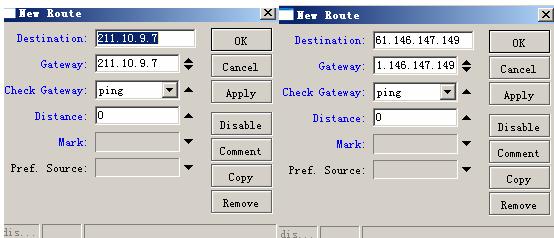
6.再添加两条策略路由,教程的意思是:让网通的检测走网通线,电信的检测走电信线。如图这里的Distance是不是填不填无所谓,还有我不明白这两个路由策略是怎么实现让网通的检测走网通线,电信的检测走电信线的?工作原理是什么呢? |
|
 |Archiver|手机版|小黑屋|软路由
( 渝ICP备15001194号-1|
|Archiver|手机版|小黑屋|软路由
( 渝ICP备15001194号-1| 渝公网安备 50011602500124号 )

 IP卡
IP卡 狗仔卡
狗仔卡
 发表于 2007-8-7 02:46:10
 提升卡
提升卡 置顶卡
置顶卡 沉默卡
沉默卡 喧嚣卡
喧嚣卡 变色卡
变色卡 显身卡
显身卡